
Microsoft has scheduled Dynamics 365 Finance & Supply Chain Management (D365 F&SCM) version 10.0.49 available for manual application on June 2026.
While Microsoft’s Release Notes for both Finance and Supply Chain Management provide a high-level overview of new features and changes, many organizations require a more in-depth and controlled approach to effectively manage their upgrade process.
When it comes to Dynamics 365 Finance & Operations (D365 Finance & SCM), managing version changes and understanding their impact on your environment is essential. That’s where AXIMPROVE solutions, particularly ConfigCompare steps in, a game changing tool that helps you effortlessly track what’s changed between versions, all in a visual, easy to understand format.
Why Config Compare is a Game Changer?
When new versions of D365 F&O are released, it can be overwhelming to manually sift through release notes and update documentation to understand exactly what’s changed. ConfigCompare automatically does the heavy lifting for you, providing a clear view of the differences between two versions, ensuring that your team can stay focused on what matters most.
Let’s take a practical example of comparing version 10.0.48 to version 10.0.49 using the (Contoso database) under ConfigCompare Monitoring. Here’s what ConfigCompare brings.
- Configuration table changes
- Row count changes
- New tables and Removed tables
- Table with new and modified fields
- Label changes
- Potential structural fixes, and other notable inconsistencies.
Upgrade Analysis Process
Our analysis followed a structured methodology:
- Export Dataset from D365 Finance & SCM 10.0.48
- Used standard definitions (all modules).
- Requested table statistics, generating 15,258 rows in TableStats.
- Requested table and entity structures, yielding 232,839 rows in TableColumns
- Upgrade to Version 10.0.49
- Export Dataset from Upgraded D365 Finance & SCM 10.0.49
- Using the same parameters, the dataset now contained
- 15,395 rows in
- 235,433 rows in TableColumns.
Config Compare: In-Depth Feature Management Analysis
Config Compare goes beyond structural and table changes, it also provides a comprehensive Feature Management Analysis. In version 10.0.49, we can discover how many new features have been introduced and out of it how many features have been automatically enabled, bringing enhanced capabilities to your system. Additionally, how many older features have been removed.
With ConfigCompare, you can easily track not only the newly added and enabled features but also identify which existing features have been disabled or re-enabled. This analysis gives you a complete picture of how your system’s features evolve with each update.
ConfigCompare also provides a detailed analysis, showing exactly which features are impacted.Additionally, ConfigCompare goes a step further by indicating whether these new features can be disabled or if they are permanently enabled by default. This ensures that organizations have complete control over their system, you get clear insights to make better decisions for your system’s configuration.
To truly understand which feature has been added or removed ConfigCompare is an essential tool.
Configuration table changes.
Our analysis identified:
- 0 tables with structural changes.
One of the significant changes has been identified
A new feature ‘Automatic accounting date advancement for budget controlled and workflow-enabled purchase requisitions and purchase orders’ in D365 Finance 10.0.49 enables automatic adjustment of accounting dates for workflow enabled purchase requisitions and purchase orders when the original accounting date falls into a closed or on-hold fiscal period, ensuring uninterrupted processing under budget control. When a fiscal period is put on hold or closed during long-running workflows, such as purchase requisitions approvals, the system automatically moves the accounting date to the next available open fiscal period within the same fiscal year, re-evaluates budget control using the updated accounting date, and maintains consistent downstream processing so that purchase requisitions can proceed to purchase orders creation and remain visible in budget reservation reporting.
ConfigCompare allows you to easily track these changes and identify which tables and rows have been modified, giving you a clear view of how updates like these could affect your operation.
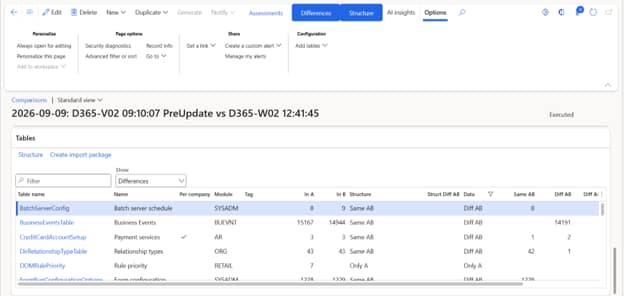
Config Compare goes further by providing insights into tables with modified fields. For example:
- Label Changes: The tool highlights any changes in field labels, ensuring you’re aware of updated terminology.
- Field Size Changes: If the size of a field has been modified, Config Compare makes it easy to spot these differences, preventing potential issues with data compatibility.
- Removed Fields: You can also quickly identify any fields that have been removed from tables, helping you manage deprecated elements and adjust your system accordingly.
Example Identification:
| TableName | FieldName | Label | Type | Length |
|---|---|---|---|---|
| RentalAttachmentTrans (Attachment transactions) | AttachedToItem |
Attached to rental item
Attached to fleet item |
String | – |
| BankPendingReviewDocument (Bank reconciliation temporary posting records) | Status | Status | String |
20
30 |
Example of Table with removed fields
Table name: SalesLine (Order lines)
| Field Name | Label | Type | Length |
|---|---|---|---|
RentalPickupInventLocationId | Pickup warehouse | String | 10 |
Full interactive Structural COmparison
As Dynamics 365 continues to evolve with regular updates and new releases, it’s more important than ever to have the right tools in place to manage these changes efficiently. ConfigCompare empowers you to stay on top of these updates, ensuring smooth transitions and maximum utilization of the new features that come with each release.
If you’re running on D365 F&O and haven’t yet adopted ConfigCompare, now is the time to level up your system’s management. Whether you’re comparing version 10.0.48 to 10.0.49 or any other future updates, ConfigCompare guarantees you’ll always be in control.
If you want to browse through the structural results yourself, please go to the web-based
Technical Overview
Want the full report?
The analysis above covers the headline numbers and ten of the meaningful things you need to know. The interactive structural comparison lets you browse the technical comparison results yourself.
The full report maps every feature in 10.0.49 to its precise database footprint. This covers all modified field definitions, and includes ConfigCompare-specific findings that don’t appear anywhere in Microsoft’s release notes.
If you want a general overview of the ConfigCompare tool you can go the the ConfigCompare page.